How to capture a useful launcher error screenshot
Evidence boundary · September 15, 2026: mechanics below are checked against official Support for the contact route and official FAQ for launcher distribution. Checklists and diagrams are editorial aids, not a recorded playtest. We have not captured the current game client or completed a withdrawal ourselves.
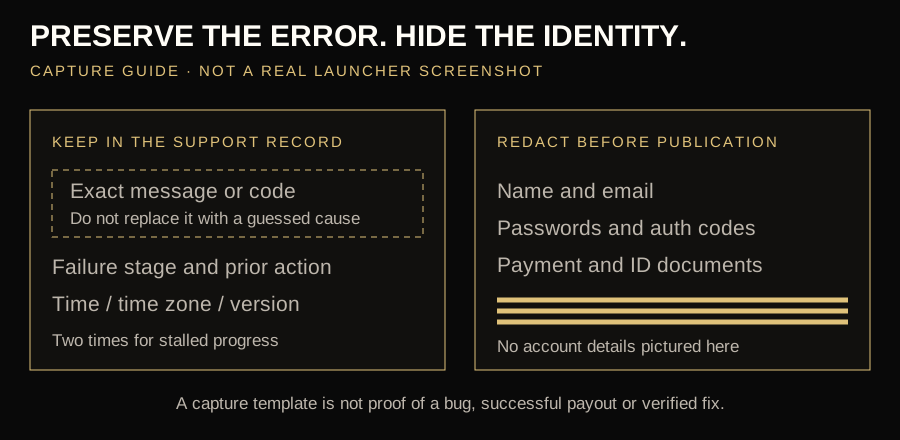
The image below is a screenshot-capture guide, not a real Paydirt Launcher screenshot. There is no verified current-client error capture in this Wiki yet. We will not invent error dialogs or label an illustration as a playtest.
| Failure stage | Keep in the record | Why it matters |
|---|---|---|
| Installer will not open | Official download source, file name, full warning and download-completion state. | A browser download warning and a game crash need different investigation. |
| Play does nothing or the game closes | Launcher version, whether a game window appears, exact error and timestamp. | Separates launcher, client-start and display stages without guessing a cause. |
| Download stalls or loops | Displayed percentage/amount, two observation times, available storage and one launcher instance. | Shows whether progress changed; one unchanged frame does not prove corruption. |
| Login or service request fails | Action attempted, code if shown, time with time zone and whether a request record exists. | Preserves information for Support; it does not justify posting credentials. |
A support-report template you can reuse
Copy these fields into a message to official Support. Leave unknown values as “not shown”; do not fill them with guesses. Keep passwords, ID documents, payment details and authentication codes out of this report.
Failure stage:
Action immediately before failure:
Exact message or code (if shown):
Date / time / time zone:
Windows version:
Launcher version / client build (if shown):
Did a game window appear?
Download percentage and observation times (if relevant):
Safe checks already tried:
Does a request confirmation exist? (if relevant):
Privacy-safe screenshot attached:
Download the blank support-report template →
What should you try first when the launcher is not working?
The safest fix depends on where the process stops. Use the first action below before reinstalling, changing permissions or touching game files.
| What you see | Likely stage | First safe action |
|---|---|---|
| The installer will not open | Download or Windows security prompt | Verify the file came from FatalFrontier.com, confirm it finished downloading and save the exact warning. |
| The launcher opens, but Play does nothing | Client launch or incomplete update | Close duplicate processes, restart Windows, let the launcher finish updating and try once. |
| Fatal Frontier 1869 crashes on startup | Game client, display or local resource stage | Record whether a window appears, check available memory and capture any Windows error before retrying. |
| The download is stuck or loops | Client download or update | Check free disk space and connection stability, keep one launcher open and wait for progress to settle. |
| Login or service error | Account, eligibility or online request | Verify the account and system clock; preserve the code, time and balance before contacting Support. |
Do not erase the evidence
A reinstall cannot fix a server-side outage or an account restriction, and it may remove the easiest clues. Preserve the error message, launcher version, time and a privacy-safe screenshot first.
Use this six-step diagnostic sequence
- 01Confirm the source
Use the official download or sign-up page. If delivery is by email, check Promotions and Spam.
- 02Name the failing stage
Separate download-link, installer, launcher sign-in, game download, update and in-game errors.
- 03Capture evidence
Record the time, complete error text, launcher version and a screenshot without passwords or payment details.
- 04Restart cleanly
Close both processes, restart Windows and confirm the Internet connection is stable.
- 05Retry once
Allow the launcher to finish its own update before opening the game. Repeated rapid retries can hide the original failure.
- 06Escalate with context
Send official Support a concise report if the same failure repeats.
The download email did not arrive
The official sign-up page says the Windows download link may be emailed. Confirm the address was entered correctly, wait for normal delivery, search the inbox for Paydirt or Fatal Frontier and check Promotions, Junk and Spam. Avoid repeatedly creating accounts; that can make it harder to know which message and identity belong together.
If no message arrives, use the official download page again or contact Support. Do not accept an executable sent by an unrelated person.
The installer will not open
- Confirm the file finished downloading.
- Check available storage.
- Read the Windows publisher prompt.
- Restart before another attempt.
- Keep Windows updated.
- Save the exact security warning.
This Wiki does not recommend bypassing SmartScreen, antivirus or administrator controls blindly. If Windows blocks the file, verify the source and ask Paydirt which publisher name and installer signature should appear.
Fatal Frontier 1869 crashes on startup or after Play
First identify whether the launcher itself closes, the game process appears and disappears, or a game window opens before the crash. Those are different failure stages. Record the sequence, visible message and approximate time; if Windows offers an error name, save it exactly rather than paraphrasing it.
Restart Windows, open only one launcher instance, let any managed update finish and try Play once. The official FAQ recommends at least 16 GB of memory and a basic graphics card, but it does not publish a complete CPU or GPU compatibility list. Close unrelated heavy applications if memory is already constrained, but do not install unofficial DLL files, driver packages or “crash fixes” from download mirrors.
If a game window remains responsive but the display mode is the problem, the August 19 developer notes say Alt + Enter toggles fullscreen and windowed mode. If the process closes before a window appears, that shortcut is not evidence of the cause; send the startup sequence to official Support.
The launcher opens but login fails
Confirm the correct email and account are being used, then use the official password-recovery route if available. Check the system date and time, because account and secure-connection checks can fail when the clock is wrong. Do not post login tokens, KYC files or passwords in Discord or a public screenshot.
An eligibility or identity message is not necessarily a launcher bug. The main game, account access and Prospecting Mode can have different age, location and verification rules.
The game will not download or update
Leave enough disk space for both the client and temporary update files, keep the launcher open until its progress settles and avoid launching multiple copies. The public FAQ recommends at least 16GB of memory and a basic graphics card but does not publish a complete CPU, storage or GPU specification.
Paydirt has shipped Early Access stability, UI and Skill Check fixes, so an older client can behave differently from the current version. Use the launcher’s managed update route instead of replacing individual files from a forum.
What if the Paydirt Launcher download is stuck?
Note the displayed percentage, downloaded amount and time before changing anything. Check whether free disk space is still available and whether another launcher instance is running. A slow or unchanged progress indicator does not by itself prove the download is corrupted, so allow one stable attempt before restarting.
If progress returns to the same point after a clean restart, preserve the screenshot and launcher version and contact Support. Do not repeatedly delete partial files unless Paydirt gives a current recovery procedure; an update-loop problem and a server-side delivery problem can look similar from the progress bar.
What about 500, 503, 504 or 700 errors?
Community reports have used these labels for server or mining failures. They do not all prove the same cause, and old reports do not establish a current outage. If one appears during a Claim, Skill Check, extraction or withdrawal, stop repeated spending, capture the balance and timestamp, and contact Support before continuing.
What should a support report include?
| Account | Account email only; never send the password. |
|---|---|
| System | Windows version, memory and whether desktop or laptop. |
| Software | Launcher and game version shown on screen. |
| Event | Local time with timezone, page or action and full error text. |
| Evidence | Privacy-safe screenshot and before/after balance when relevant. |
| Reproduction | The shortest steps that consistently trigger the problem. |
Official Support publishes [email protected], toll-free phone support and weekday live-chat hours on its Support page.
Frequently asked questions
Why does Fatal Frontier 1869 crash on startup?
The public sources do not establish one universal cause. Record whether the launcher closes, whether a game window appears and any Windows error; restart, finish the managed update and retry once before sending that sequence to Support.
What should I do if the launcher download is stuck?
Check free space, connection stability and duplicate launcher processes, then allow one stable attempt. If it stalls at the same point again, preserve the percentage, time and launcher version for Support.
Should I reinstall immediately?
No. First identify the failure stage and preserve error details. Reinstallation is more useful for a damaged local client than for an account or server-side error.
Can I use a third-party download mirror?
Not recommended. Use FatalFrontier.com and the Paydirt Launcher.
Does the game support windowed mode?
The August 19 patch notes say Alt + Enter toggles fullscreen and windowed mode.
Where can I check current outages?
Use official Support for account or service issues and the official Discord for current community discussion and developer updates. This Wiki does not currently have a live server-status feed.
Checked September 24, 2026 against the official download, sign-up, FAQ, Support, Community page and August 19 patch notes. Error-code discussion is community-derived and may be outdated. Illustration is original and unofficial.